49 Inch Transparent Screen Display Box Price With Interactive Touch Showcase Advertising Display Screen
Build the Story Around the Object, Not the Screen
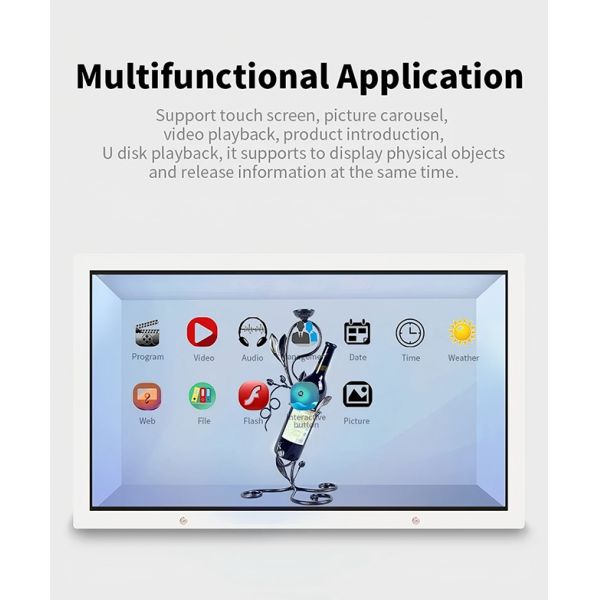
A transparent showcase works best when the physical object remains the reason people stop. The 49-inch transparent LCD becomes a controlLCD layer for labels, motion graphics, exploded views and short prompts, while the product stays visible behind the image. This is a different design problem from ordinary digital signage: the content and the object occupy the same visual space, so every graphic must earn its place.
The 49-inch format suits a single hero product or a tightly edited group—consumer electronics, footwear, collectibles, mechanical parts or a museum artifact. Before designing the cabinet, decide which detail should be seen first from the aisle and which information should appear only after a visitor approaches. That simple sequence prevents the display from turning into a bright video box that hides what it is meant to reveal.
A Three-Layer Showcase Composition
Think of the installation as three layers. The front layer is the transparent LCD, where high-contrast titles and animation appear. The middle layer is the product itself. The rear layer is the cabinet background and lighting. If all three compete, transparency loses its value. A dark, restrained background usually gives white and colored pixels more presence, while carefully aimed internal light keeps the physical item readable.
Leave deliberate blank areas in the media wherever the object needs to remain visible. Instead of running a full-screen commercial, use motion to trace a feature, introduce a material or connect a specification to the relevant part. Slow transitions and short loops are easier to follow than constant effects. The result should feel like a product demonstration, not a video placed in front of merchandise.
When Touch Adds Something Useful
Optional touch is valuable when visitors have a real choice to make: selecting a model, comparing finishes, opening a technical view or changing language. It is less useful when the only action is replaying a video. Keep the first screen obvious, make touch targets generous and return to the attract loop automatically after inactivity. For unattended public use, the interface should recover without staff intervention.
A content team should also decide whether touching the screen changes only the digital layer or corresponds to the physical product. If several items are displayed, clear visual mapping is essential. Product sensors, QR codes or an external control system may be added as part of a custom integration, but those functions should be confirmed during project design rather than implied by the screen alone.
| 49 inch transparent screen display Box |
| General Display |
Screen Size |
49 inches |
| Panel Type |
a‑Si TFT IPS Transparent LCD Panel |
| Panel Model |
HNT4901 |
| Native Resolution |
1920 × 1080 pixels (Full HD) |
| Pixel Format |
RGB Vertical Stripe |
| Sub‑Pixel Pitch |
0.18642 × 0.55926 mm (H × V) |
| Pixel Pitch |
0.4902 × 0.4902 mm (H × V) |
| Active Display Area |
1074 × 604 mm (H × V) |
| Panel Shape |
Flat Rectangular Panel |
| Aspect Ratio |
16:9 |
| Panel Transmittance |
>75% |
| Contrast Ratio |
1200:1 (Typical) |
| Viewing Angle |
89°/89°/89°/89° (Minimum), CR ≥10 |
| Display Mode |
IPS, Normally Black, Transmissive |
| Optimum Viewing Direction |
All Viewing Angles |
| Response Time |
6 ms (Typical, Gray‑to‑Gray) |
| White Chromaticity |
Wx: 0.281; Wy: 0.288 |
| Display Colors |
16.7 Million Colors, 8‑bit + Hi‑FRC |
| Color Gamut |
68% NTSC, CIE 1931 |
| Panel Input Voltage |
DC 12V, 5A |
| Refresh Rate |
60 Hz |
| Panel Signal Interface |
LVDS |
| Input Interfaces |
HDMI, VGA, USB and Audio Input |
| Operating Temperature |
-20°C to 50°C |
| Storage Temperature |
-30°C to 60°C |
| Operating Humidity |
10%–90% RH |
| Storage Humidity |
5%–90% RH |
| Power Supply |
AC 100–240V, 50/60 Hz |
| Power Consumption |
<200W |
| Standby Power Consumption |
<3W |
| Installation Options |
Desktop, Floor‑Standing or Interactive Version |
| Product Dimensions |
Refer to the Mechanical Drawing |
| USB Plug‑and‑Play Player |
Operating System |
Standalone Plug‑and‑Play System; No Windows OS Required |
| Automatic Playback |
Automatically Starts Loop Playback After Power‑On |
| Input Ports |
1 × USB 2.0, 1 × HDMI |
| Default Storage Medium |
USB Flash Drive |
| Optional Storage Medium |
SD Card |
| Content Update |
Automatically Copies Content from USB |
| OSD Languages |
English and Chinese |
| Supported Video Format |
MP4 |
| Supported Audio Format |
MP3 |
| Supported Image Format |
JPG |
| Supported Text Format |
TXT |
| Audio Output |
Built‑In Power Amplifier |
| Playback Modes |
Single‑File Repeat or All‑Files Loop Playback |
| Android Media Player |
CPU |
Quad‑Core Cortex‑A17, Up to 1.8 GHz |
| GPU |
Mali‑T764 |
| Operating System |
Android 7.1 |
| RAM |
2GB DDR3 |
| Internal Storage |
16GB eMMC |
| External Storage |
SATA, USB, SD Card or CF Card |
| Output Resolution |
1920 × 1080, Full HD |
| Playback Modes |
Loop Playback, ScheduLCD Playback and Transition Effects |
| Network Connectivity |
Ethernet and Wi‑Fi; 3G Optional |
| Remote Control |
Infrared Remote Control Supported |
| Memory Card Support |
SD and CF Cards |
| Supported Video Formats |
WMV, AVI, FLV, RM, RMVB, MPEG, TS, MP4 and More |
| Supported Image Formats |
BMP, JPEG, PNG and GIF |
| Supported Network Protocols |
TCP/IP, PPPoE, ICMP, DHCP, DNS, FTP and HTTP |
| USB 2.0 Ports |
2 × Host Ports for Mouse, Keyboard and Other Devices |
| RJ45 Ethernet |
1 × RJ45 Port, 10/100 Mbps |
| Wireless Network |
2.4 GHz Wi‑Fi, IEEE 802.11n, Up to 150 Mbps |
| TF Card Slot |
1 × TF/MicroSD Card Slot |
| Built‑in Windows PC – Entry |
CPU |
Intel 1037U, Dual‑Core, Dual‑Thread, 1.8 GHz |
| Motherboard |
Mini‑ITX Architecture, Intel Bay Trail SoC Chipset |
| Memory |
Kingston 4GB DDR3 1600 MHz |
| Storage |
120GB SSD |
| Graphics |
Integrated Intel HD Graphics with Dynamic Video Memory Technology |
| Power Supply |
Integrated 12V Power Supply |
| Network |
Realtek 8111E Gigabit Ethernet and 2.4 GHz Wi‑Fi |
| Built‑in Windows PC – Standard |
CPU |
3rd Generation Intel Core i3, Dual‑Core, Four‑Thread, 1.8 GHz, 17W |
| Motherboard |
Mini‑ITX Architecture, Intel HM76 Chipset |
| Memory |
Kingston 4GB DDR3 1600 MHz |
| Storage |
120GB SSD |
| Graphics |
Integrated Intel HD Graphics 4000 |
| Power Supply |
Integrated 12V Power Supply |
| Network |
Realtek 8111E Gigabit Ethernet and 2.4 GHz Wi‑Fi |
| Built‑in Windows PC – Advanced |
CPU |
3rd Generation Intel Core i5, Dual‑Core, Four‑Thread, 1.7 GHz, 17W |
| Motherboard |
Mini‑ITX Architecture, Intel HM76 Chipset |
| Memory |
Kingston 4GB DDR3 1600 MHz |
| Storage |
120GB SSD |
| Graphics |
Integrated Intel HD Graphics 4000 |
| Power Supply |
Integrated 12V Power Supply |
| Network |
Realtek 8111E Gigabit Ethernet and 2.4 GHz Wi‑Fi |
| Built‑in Windows PC – Premium |
CPU |
7th Generation Intel Core i7, Dual‑Core, Four‑Thread, 2.7 GHz, 15W |
| Motherboard |
Mini‑ITX Architecture |
| Memory |
Kingston 4GB DDR3 1600 MHz |
| Storage |
120GB SSD |
| Graphics |
Integrated Intel HD Graphics |
| Power Supply |
Integrated 12V Power Supply |
| Network |
Realtek 8111E Gigabit Ethernet and 2.4 GHz Wi‑Fi |
| Infrared Touch Frame |
Touch Technology |
Infrared Touch |
| Integration Method |
Seamlessly Integrated, Embedded Design |
| Touch Resolution |
32768 × 32768, Driver‑Free |
| Activation Force |
No Pressure Required |
| Light Transmittance |
>92% |
| Multi‑Touch Response Time |
10–15 ms |
| Single‑Touch Response Time |
7 ms |
| Minimum Touch Object Size |
4 × 4 mm |
| Touch Object Size Recognition |
Supported |
| Touch Interface |
USB |
| Touch Scan Rate |
≥110 Hz |
| Communication Interface |
USB 2.0 Full‑Speed |
| Power Supply |
1 × USB |
| Operating Voltage |
DC 5.0V ±5% |
| Average Current |
≤200 mA |
| Power Consumption |
≤1.0W |
| LCD Service Life |
60,000 Hours |
| Fault Tolerance |
Remains Operational with Less Than 10% Non‑Adjacent Sensor Failure |
| Operating Humidity |
Up to 90% RH at 0°C to 40°C, Non‑Condensing |
| Operating Temperature |
-10°C to 50°C |
| Storage Temperature |
-20°C to 60°C |
| ESD Protection |
EN 61000‑4‑2:2008, Level 3; 4 kV Contact Discharge and 8 kV Air Discharge |
| Ambient Light Resistance |
Excellent |
| Firmware Upgrade |
USB Firmware Upgrade |
| Multi‑Touch OS Support |
Win 10, Win 8, Win 7 and Android |
| Single‑Touch OS Support |
Win XP, macOS and Linux |
| Projected Capacitive Touch |
Touch Technology |
Projected Capacitive Touch |
| Input Method |
Finger or Stylus |
| Number of Touch Points |
10‑Point Multi‑Touch |
| Activation Force |
10–60 g |
| Touch Durability |
≥35 Million Touches |
| Minimum Pressure |
<10 g |
| Surface Hardness |
≥7H |
| Storage Conditions |
-15°C to 40°C at <90% RH; 40°C to 70°C at <60% RH |
| Operating Humidity |
10%–90% RH at 40°C, Non‑Condensing |
| Response Time |
<10 ms |
| Light Transmittance |
>85% |
| Touchscreen Structure |
1.1 mm Glass + 0.125 mm Upper ITO Film + 0.125 mm Lower ITO Film |
| Position Durability |
50 Million Touches at the Same Position |
| Packing List |
Power Cable |
1 |
| Warranty Card |
1 |
| Remote Control |
1 |
| Cabinet Key |
1 |
| Certificate of Conformity |
1 |
What the Published Specification Tells a Buyer
The listed Transparent Screen Display uses a 49-inch A-Si TFT-IPS transparent panel. Published options include 1920 × 1080 or 3840 × 2160 resolution, panel transparency above 75%, an 8 ms typical response time, multi-language OSD and desktop, floor-standing or interactive configurations. The cabinet is described as metal and glass, with white, black or customized exterior color and AC 100–240 V input.
Those figures are a starting point, not the complete cabinet brief. Request the approved dimensional drawing, active display area, internal product volume, door direction, ventilation path, touch technology, player configuration and cable exit before approving artwork or furniture. Resolution and touch options should be tied to the final configuration in the quotation.
Plan the First Demonstration
For a proof of concept, use the actual object, the intended background finish and a draft loop containing both bright graphics and transparent pauses. Test from the aisle distance and from close range. Check reflections, legibility, product access, heat and the time required to replace merchandise. This small trial reveals more than a screen-only video because it reproduces the visual conditions that determine whether a transparent LCD succeeds.
Send ZXTLCD the product dimensions, installation style, viewing distance, touch requirement and preferred playback method. The project team can then align the cabinet, screen, internal lighting and content canvas around one coherent showcase rather than treating them as separate purchases.

Practical FAQ
Is the product image a true free-air hologram?
No. The effect is created by transparent LCD content layered over a real object inside a designed display box.
Can the cabinet run without a network?
A suitable local media-player configuration can support scheduLCD or looping playback; confirm the chosen player and update method.
What artwork should be prepared first?
Start with a short test loop that includes black or transparent-looking areas, restrained motion and graphics positioned around the real object.
Request a Project-Specific Proposal
Share the installation drawing, physical product dimensions, viewing distance, content plan, interaction method, player preference and delivery destination. ZXTLCD can use these details to confirm the display configuration, cabinet structure and integration scope for your project.


If you would like to get the specification about above product, or you hope to discuss your requirements or need any additional information on our this product , then please do not hesitate to send us a inquiry and contact our sales team now.
Product Tags:

|
|
49 Inch Transparent Screen Display Box Price With Interactive Touch Showcase Advertising Display Screen Images
|


